Table of Contents
What Is a WhatsApp Chat QR Code?
https://wa.me/<number>?text=<greeting> scheme. Users initiate contact immediately without manually saving numbers to their contacts.QR (Quick Response) codes have revolutionized how businesses and individuals bridge physical interactions with digital actions. A whatsapp chat QR code provides an instantaneous, touch-free connection for your target audience, removing manual data entry hurdles and accelerating user engagement across all major smartphone platforms.
How Does a WhatsApp Chat QR Code Work?
When a smartphone camera points at a whatsapp chat QR code, the camera's optical sensor instantly reads the 2D matrix pattern and decodes the embedded wa.me click-to-chat protocol. Modern mobile operating systems (iOS and Android) automatically identify the payload and present an on-screen prompt, allowing the user to complete the action with a single tap.

How to Create a WhatsApp Chat QR Code (Step-by-Step)
Enter Your WhatsApp Chat Data
Fill in the required information into the generator fields at the top of this page.
Customize Design & Colors
Personalize your QR code with brand colors, gradient fills, and custom logos.
Download High-Res File
Export your finished QR code in vector SVG or high-resolution PNG format.
Why Choose Our Free WhatsApp Chat QR Code Generator
[OK] Zero Friction Interaction
Eliminate typing errors and connect your audience to your whatsapp chat with a single scan.
[OK] Free to Use
Create static QR codes without a subscription or watermark. The QR pattern itself does not count scans; any linked website or service has its own availability and terms.
[OK] static QR code format
Static QR codes do not expire automatically and remain functional indefinitely as long as your destination data is active.
[OK] Print-Ready Formats
Download vector SVG and 2048px Ultra-HD PNG files for crisp printing on any physical medium.
Where and How Businesses Use WhatsApp Chat QR Codes
Marketing Flyers & Print Ads
Include whatsapp chat QR codes on brochures, banners, and magazine ads to drive immediate engagement.
Product Packaging & Labels
Add QR codes to retail packaging to deliver product details, warranties, and direct customer assistance.
Business Cards & Networking
Transform physical business cards into interactive digital touchpoints for instant professional connections.
Storefronts & Point-of-Sale
Display whatsapp chat QR codes at billing counters and display windows to engage walk-in visitors.
Best Practices for Designing & Printing WhatsApp Chat QR Codes
Follow these essential guidelines to guarantee maximum readability and seamless scanning:
- •Maintain High Contrast: Use dark foreground colors on light backgrounds (at least 4:1 contrast ratio).
- •Observe Quiet Zones: Leave adequate white border margin around the QR code so scanners can distinguish it from surroundings.
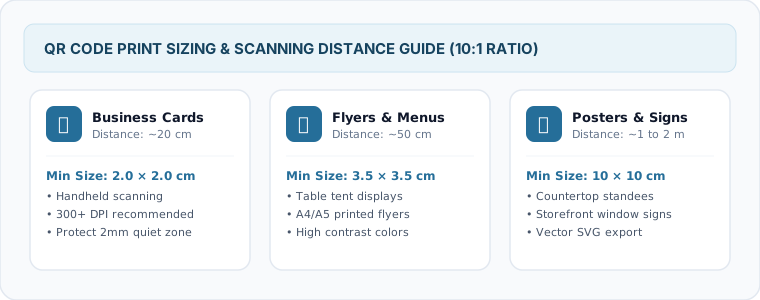
- •Minimum Print Size: Print at a minimum size of 2 x 2 cm (0.8 x 0.8 inches) for handheld scans.
- •Test Before Mass Printing: Always test scan the generated code on multiple devices (iOS and Android) under various lighting conditions.