Table of Contents
What Is a Plain Text QR Code?
QR (Quick Response) codes have revolutionized how businesses and individuals bridge physical interactions with digital actions. A plain text QR code provides an instantaneous, touch-free connection for your target audience, removing manual data entry hurdles and accelerating user engagement across all major smartphone platforms.
How Does a Plain Text QR Code Work?
When a smartphone camera points at a plain text QR code, the camera's optical sensor instantly reads the 2D matrix pattern and decodes the embedded raw text data. Modern mobile operating systems (iOS and Android) automatically identify the payload and present an on-screen prompt, allowing the user to complete the action with a single tap.
How to Create a Plain Text QR Code (Step-by-Step)
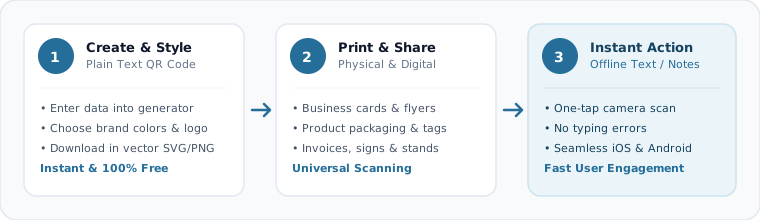
Enter Your Plain Text Data
Fill in the required information into the generator fields at the top of this page.
Customize Design & Colors
Personalize your QR code with brand colors, gradient fills, and custom logos.
Download High-Res File
Export your finished QR code in vector SVG or high-resolution PNG format.
Why Choose Our Free Plain Text QR Code Generator
[OK] Zero Friction Interaction
Eliminate typing errors and connect your audience to your plain text with a single scan.
[OK] Free to Use
Create static QR codes without a subscription or watermark. The QR pattern itself does not count scans; any linked website or service has its own availability and terms.
[OK] static QR code format
Static QR codes do not expire automatically and remain functional indefinitely as long as your destination data is active.
[OK] Print-Ready Formats
Download vector SVG and 2048px Ultra-HD PNG files for crisp printing on any physical medium.
Where and How Businesses Use Plain Text QR Codes
Marketing Flyers & Print Ads
Include plain text QR codes on brochures, banners, and magazine ads to drive immediate engagement.
Product Packaging & Labels
Add QR codes to retail packaging to deliver product details, warranties, and direct customer assistance.
Business Cards & Networking
Transform physical business cards into interactive digital touchpoints for instant professional connections.
Storefronts & Point-of-Sale
Display plain text QR codes at billing counters and display windows to engage walk-in visitors.
Best Practices for Designing & Printing Plain Text QR Codes
Follow these essential guidelines to guarantee maximum readability and seamless scanning:
- •Maintain High Contrast: Use dark foreground colors on light backgrounds (at least 4:1 contrast ratio).
- •Observe Quiet Zones: Leave adequate white border margin around the QR code so scanners can distinguish it from surroundings.
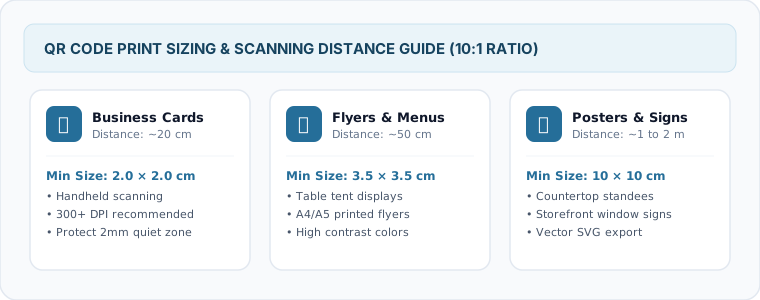
- •Minimum Print Size: Print at a minimum size of 2 x 2 cm (0.8 x 0.8 inches) for handheld scans.
- •Test Before Mass Printing: Always test scan the generated code on multiple devices (iOS and Android) under various lighting conditions.